Mage and Kathy asked me how to enable your blog post to allow a reply to a comment right under the comment. I'd forgotten how I did it so I had look it up under threaded comments. Here's the link to the Blogger Help I got. And I've also copied and pasted it below.

I learned all this from another blogger friend, but sadly I've forgotten which wonderful blogger it was.
I have to tell you that certain comment options (including this one) make it a little harder to use on the iPad. It's weird.
Anyway, this is how I'm doing it for now. I like it because I can put a reply right under the blogger friend's question or comment. It also opens it up to others to start a conversation with anybody.
I hope this helps, Mage and Kathy and that it didn't confuse you and everybody else.
Threaded comments
Single level commenting allows a reader to post a comment to a post. Threaded commenting allows a reader to reply to other reader comments on that post. Blogger supports threaded commenting with two levels -- the original comment, and the replies to that comment.
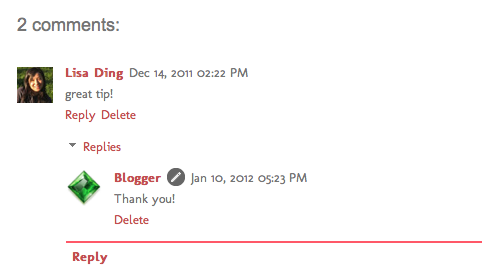
I thought I'd add a picture to make it more clear. At least I hope it makes it clearer.For example, let's say that Fred reads Julie's baking blog, and comments on a post she wrote about chocolate lava cake, suggesting that it tastes great with raspberries. Sarah, another reader of Julie's blog and also a huge fan of raspberries, wants to reply directly to Fred. With 2-level commenting, Sarah can click "Reply to this comment" directly under Fred's text, and respond to him. Anyone else interested in responding to Fred's comment can do so as well, adding onto the second tier of comments.
Enabling threaded commenting
If you have commenting enabled on your blog, then threaded commenting will work provided you have your blog feed set to "Full," and have chosen the “Embedded" option as opposed to “Full page” or “Popup window.” To change your commenting settings, just go to the Comments section under Settings | Posts and comments. The setting to change your blog feed can be found under Settings | Other.
Notifications
A threaded commenting system means more discussion and back-and-forth dialogue. If you’d like to be notified of any updates to a discussion, just click “Follow by email” to subscribe to the thread. This way, you’ll be notified via email so you can keep up with the conversation. Keep in mind that this is a different subscription than the “Follow by email” gadget used to follow another blogger’s blog posts.
I learned all this from another blogger friend, but sadly I've forgotten which wonderful blogger it was.
I have to tell you that certain comment options (including this one) make it a little harder to use on the iPad. It's weird.
Anyway, this is how I'm doing it for now. I like it because I can put a reply right under the blogger friend's question or comment. It also opens it up to others to start a conversation with anybody.
I hope this helps, Mage and Kathy and that it didn't confuse you and everybody else.

That's very clear, Kay - thank you. I often wondered how it was done!!
ReplyDelete. . . and I've just been playing with it on my blog! :-)
DeleteI have finally now begun responding to my comments via email - I didn't even realize I could do that until recently!!
ReplyDeleteI should think more about doing the email option for important questions. I just assumed that if people really wanted to know if I replied, they'd come and check the next day.
DeleteHi Kay, I do not like nor use threaded comments for several reasons... First of all, I don't like blog comments on (at the end) of the blog. I use the Pop Up Window since I think it is easier for someone to scroll back and forth in the blog post in order to make comments. If I put the comment at the END of the blog ---it's much harder to scroll all of the way back up to read something in the blog again. Just my personal choice!
ReplyDeleteAlso---I do not have time to return to blogs to read replies.. Since I have about 100 blogs to visit, I do well enough finding time to get to those blogs once... Again, just my personal opinion.
I do however love it when someone uses their email address (instead of noreply) ---since I get all blog comments in my email. If I have their email address, I can easily reply to their comments --if they have left me a question.
I have been blogging since 2006---and am always looking for ways to make it easier.. IF this new system works for you, then do it. Just remember that many of us do NOT return to read replies...
Hugs,
Betsy
Thank you for giving us another point of view on this subject, Betsy. I do still like this method so far because everyone can see my reply easily. You're right that if I need someone to see a reply for sure, I should answer them also in a separate email, but that does take a bit more time for me.
DeleteThank you for the info - I changed my settings and going to give it a try.
ReplyDeleteI see it worked for you. I hope nobody writes to tell you they can't leave a comment like Mage.
DeleteThank you, Kay. I don't post often, but it is nice to know how to do this.
ReplyDeletea little confusing but I don't have time to comment on comments-life is too busy but thanks anyway!
ReplyDeleteI can't do it every time. But I like that I can if I want to.
DeleteI managed to do this awhile back, thanks for the reminder as I forgot already what I did!
ReplyDeleteI did this on my blog at one point, but had totally forgotten that it just wasn't automatically there. I don't even know about pop-up comments. So much to learn all the time.
ReplyDeleteSo many choices, so little time.
ReplyDeleteK
I also rarely revisit a post, since I follow so many. I tried this for awhile, but some readers had problems with embedded comments, so I went back to full screen. So far, so good. :-)
ReplyDeleteYou are a great instructor. Dianne
ReplyDeleteIt works fine here. I should frame your note. It took me a tentative litttle time of fuss, but I made it work. Thhank you very much.
ReplyDeleteNope, George can't leave me a note at all. Very confusing. I'm going to put it back and try to figure out the problem.
ReplyDeleteOh no... I'm so sorry, Mage. I did have one person write to tell me they weren't able to comment on my blog. I don't know why. I told them to try writing their comment as Anonymous and write their name in the comment box. I don't know if it worked or not.
DeleteThat is a good suggestion. I'll look into it.
ReplyDeleteSince I'm blogless, I thought when I replied under the first thread, everyone could read it. So I could only reply directly to Mr. Chapin's, for instance, if I had my own blog? Hmm, confused, but happy. DrumMajor
ReplyDeleteYes, when you replied under Hank's comment on this blog, everybody could read it. It would be the same thing if you had your own blog. With this comment format, everybody can Reply directly underneath a comment anybody makes.
DeleteFunny how everyone prefers different styles. My pet peeve is when some people use alternate comment boxes like Disqus.
ReplyDeleteyou TECHY!
ReplyDeleteALOHA from Honolulu
Comfort Spiral
=^..^= <3
Always the teacher, and a good one at that. Thanks!
ReplyDeleteI'll have to get back to this when I'm not so groggy and see if I want to use it. I know so very little about all of the options on Blogger.
ReplyDeleteCool...I just set it all up! Thank you!!!
ReplyDelete