Mage and Kathy asked me how to enable your blog post to allow a reply to a comment right under the comment. I'd forgotten how I did it so I had look it up under threaded comments. Here's the link to the Blogger Help I got. And I've also copied and pasted it below.

I learned all this from another blogger friend, but sadly I've forgotten which wonderful blogger it was.
I have to tell you that certain comment options (including this one) make it a little harder to use on the iPad. It's weird.
Anyway, this is how I'm doing it for now. I like it because I can put a reply right under the blogger friend's question or comment. It also opens it up to others to start a conversation with anybody.
I hope this helps, Mage and Kathy and that it didn't confuse you and everybody else.
Threaded comments
Single level commenting allows a reader to post a comment to a post. Threaded commenting allows a reader to reply to other reader comments on that post. Blogger supports threaded commenting with two levels -- the original comment, and the replies to that comment.
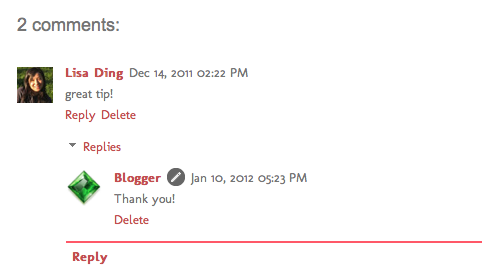
I thought I'd add a picture to make it more clear. At least I hope it makes it clearer.For example, let's say that Fred reads Julie's baking blog, and comments on a post she wrote about chocolate lava cake, suggesting that it tastes great with raspberries. Sarah, another reader of Julie's blog and also a huge fan of raspberries, wants to reply directly to Fred. With 2-level commenting, Sarah can click "Reply to this comment" directly under Fred's text, and respond to him. Anyone else interested in responding to Fred's comment can do so as well, adding onto the second tier of comments.
Enabling threaded commenting
If you have commenting enabled on your blog, then threaded commenting will work provided you have your blog feed set to "Full," and have chosen the “Embedded" option as opposed to “Full page” or “Popup window.” To change your commenting settings, just go to the Comments section under Settings | Posts and comments. The setting to change your blog feed can be found under Settings | Other.
Notifications
A threaded commenting system means more discussion and back-and-forth dialogue. If you’d like to be notified of any updates to a discussion, just click “Follow by email” to subscribe to the thread. This way, you’ll be notified via email so you can keep up with the conversation. Keep in mind that this is a different subscription than the “Follow by email” gadget used to follow another blogger’s blog posts.
I learned all this from another blogger friend, but sadly I've forgotten which wonderful blogger it was.
I have to tell you that certain comment options (including this one) make it a little harder to use on the iPad. It's weird.
Anyway, this is how I'm doing it for now. I like it because I can put a reply right under the blogger friend's question or comment. It also opens it up to others to start a conversation with anybody.
I hope this helps, Mage and Kathy and that it didn't confuse you and everybody else.


